

Product Updates

Product Spotlight: Fullscript Labs

Fullscript Labs is now available in Healthie, streamlining lab ordering and results into the same all-in-one platform where care is managed.

Melissa Bhatia
Melissa Bhatia
Published on May 12, 2026
Updated on May 12, 2026

Lab testing has become a routine part of care delivery for many private practices specializing in nutrition, functional, and integrative care. Lab results help clinicians move beyond symptoms alone, support clinical decision-making, and give clients clearer insight into what’s happening beneath the surface.

At the same time, labs often introduce complexity on the operational side. Ordering tests, managing results, and keeping records up to date can become fragmented, especially when labs live outside the system where the rest of care is documented. Over time, this fragmentation creates extra administrative work and makes it harder to incorporate lab data into clinical decision making during sessions.

As practices grow, these small inefficiencies tend to surface more clearly. What works for a handful of clients becomes harder to sustain at scale, and lab workflows are often one of the first places that strain shows up.

Why Healthie added Labs to the Fullscript integration

Using multiple external tools can create friction and disrupt workflows. Lab orders are placed in one system, results arrive elsewhere, and files are manually uploaded or referenced during sessions. While none of these steps are particularly complex on their own, they add up quickly—especially in growing practices with multiple clinicians and staff. When lab data is kept separate, it’s also harder to consistently reference results alongside notes, goals, and other clinical interventions.

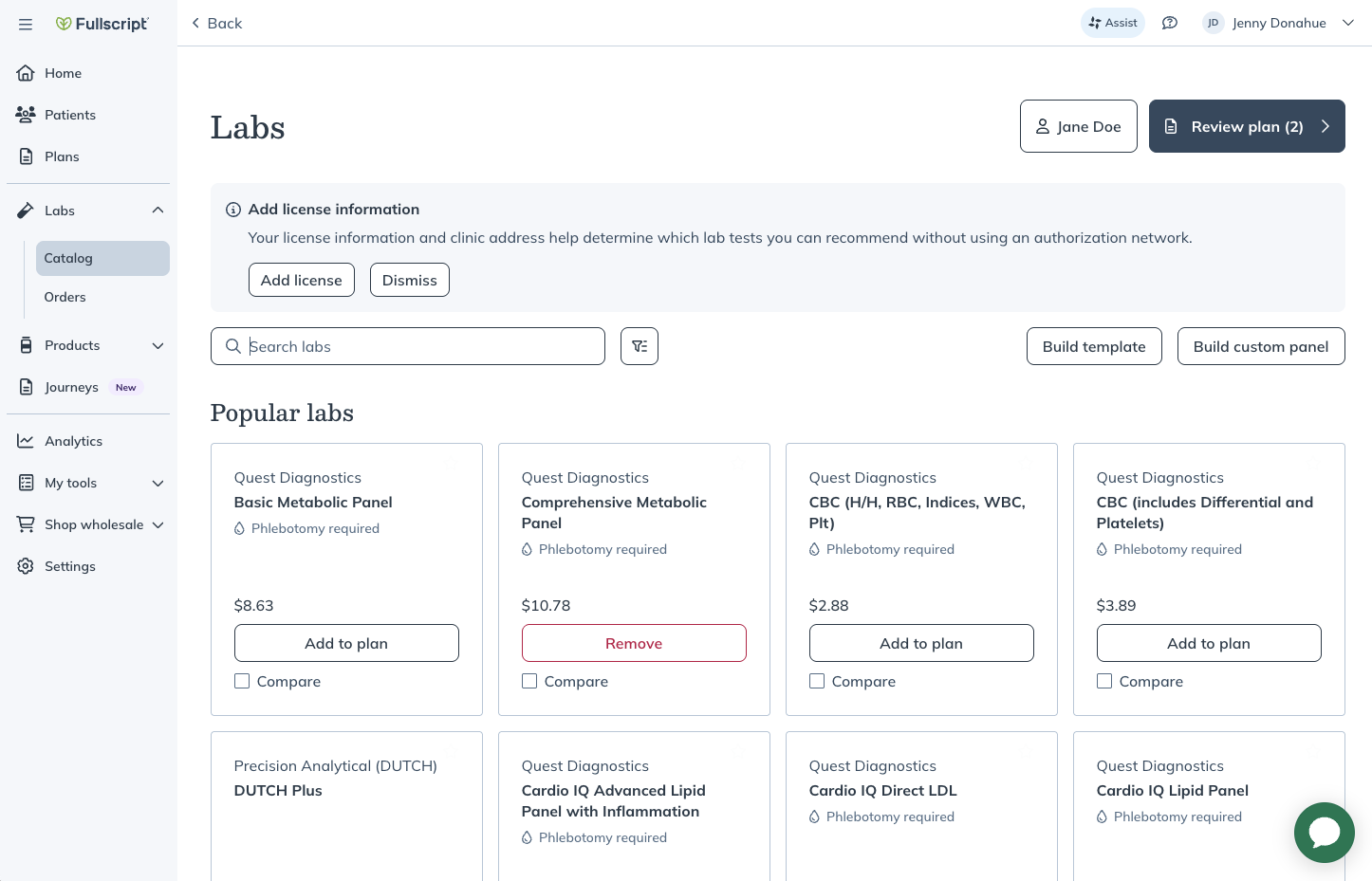
With Labs on Fullscript integrated with Healthie, lab workflows move into the same environment clinicians already use in their day to day. Clinicians can access Fullscript  from within a client’s Healthie portal, recommend and order labs through a client’s synced Fullscript account, and view results within Healthie. There’s no need to track down PDFs or move documents between systems, and lab data stays tied to the client record where it’s most useful.
How Fullscript Labs fits into daily clinical work

Clinically, this changes how easy it is to work with lab data. Results can be reviewed in context, alongside session notes and historical information, rather than as standalone files. Once a lab test is completed and results are in, clinicians can view this information in the Client Overview and Labs tab. For clinicians who regularly use labs to guide recommendations, this makes it easier to revisit results over time, explain changes to clients, and incorporate data into ongoing care without breaking focus during appointments.

For clinicians juggling multiple clients and an endless task list, this simply reduces the friction involved in accessing lab ordering and results when they’re needed.

Operational impact for growing practices

From an operational perspective, the value is mostly about consolidation. Every additional tool a practice relies on introduces overhead, including logins to manage, processes to document, and edge cases when something doesn’t sync as expected. As practices grow, that overhead compounds. 

Centralizing lab workflows within Healthie reduces the number of systems staff and clinicians need to touch, which helps keep records cleaner and processes more consistent over time.

This is particularly relevant for group practices and virtual clinics, where standardization matters. When labs live in the same place as charting and scheduling, onboarding new clinicians becomes simpler and internal workflows are easier to maintain.

Watch the tutorial on how to leverage Fullscript in Healthie.

Billing and workflow flexibility

Billing workflows remain flexible. Practices can choose whether clients pay Fullscript directly or whether labs are paid for upfront and invoiced through Healthie. This allows labs to fit into existing financial processes without forcing changes to how practices already operate.

What this update does (and doesn’t) change

This update is focused on where lab workflows live, not how labs are selected or interpreted. Labs on Fullscript doesn’t change which labs are available through Fullscript, and it doesn’t alter how results are interpreted or used clinically. The improvement is structural rather than clinical: a client’s Healthie portal is synced with their Fullscript account, and lab data is now surfaced within Healthie.

By bringing lab results into the same workflow as the rest of care delivery, practices can reduce manual steps and make lab data easier to reference as part of ongoing care.

Who this is best suited for

Labs on Fullscript in Healthie is best suited for practices that already use Healthie as their primary system and want to incorporate lab diagnostics without expanding their tech stack. It won’t change how you practice, but it can make how you operate more manageable as volume and complexity increase.

Next steps

Getting started is straightforward, especially if you already use Fullscript with Healthie for recommending supplements. For a complete walkthrough of setup and workflow details, you can follow the official guide here: Labs on Fullscript and Healthie.

Launch, grow & scale your business today.

Product Updates

Product Spotlight: Fullscript Labs

Fullscript Labs is now available in Healthie, streamlining lab ordering and results into the same all-in-one platform where care is managed.

Lab testing has become a routine part of care delivery for many private practices specializing in nutrition, functional, and integrative care. Lab results help clinicians move beyond symptoms alone, support clinical decision-making, and give clients clearer insight into what’s happening beneath the surface.

At the same time, labs often introduce complexity on the operational side. Ordering tests, managing results, and keeping records up to date can become fragmented, especially when labs live outside the system where the rest of care is documented. Over time, this fragmentation creates extra administrative work and makes it harder to incorporate lab data into clinical decision making during sessions.

As practices grow, these small inefficiencies tend to surface more clearly. What works for a handful of clients becomes harder to sustain at scale, and lab workflows are often one of the first places that strain shows up.

Why Healthie added Labs to the Fullscript integration

Using multiple external tools can create friction and disrupt workflows. Lab orders are placed in one system, results arrive elsewhere, and files are manually uploaded or referenced during sessions. While none of these steps are particularly complex on their own, they add up quickly—especially in growing practices with multiple clinicians and staff. When lab data is kept separate, it’s also harder to consistently reference results alongside notes, goals, and other clinical interventions.

With Labs on Fullscript integrated with Healthie, lab workflows move into the same environment clinicians already use in their day to day. Clinicians can access Fullscript  from within a client’s Healthie portal, recommend and order labs through a client’s synced Fullscript account, and view results within Healthie. There’s no need to track down PDFs or move documents between systems, and lab data stays tied to the client record where it’s most useful.

How Fullscript Labs fits into daily clinical work

Clinically, this changes how easy it is to work with lab data. Results can be reviewed in context, alongside session notes and historical information, rather than as standalone files. Once a lab test is completed and results are in, clinicians can view this information in the Client Overview and Labs tab. For clinicians who regularly use labs to guide recommendations, this makes it easier to revisit results over time, explain changes to clients, and incorporate data into ongoing care without breaking focus during appointments.

For clinicians juggling multiple clients and an endless task list, this simply reduces the friction involved in accessing lab ordering and results when they’re needed.

Operational impact for growing practices

From an operational perspective, the value is mostly about consolidation. Every additional tool a practice relies on introduces overhead, including logins to manage, processes to document, and edge cases when something doesn’t sync as expected. As practices grow, that overhead compounds. 

Centralizing lab workflows within Healthie reduces the number of systems staff and clinicians need to touch, which helps keep records cleaner and processes more consistent over time.

This is particularly relevant for group practices and virtual clinics, where standardization matters. When labs live in the same place as charting and scheduling, onboarding new clinicians becomes simpler and internal workflows are easier to maintain.

Watch the tutorial on how to leverage Fullscript in Healthie.

Billing and workflow flexibility

Billing workflows remain flexible. Practices can choose whether clients pay Fullscript directly or whether labs are paid for upfront and invoiced through Healthie. This allows labs to fit into existing financial processes without forcing changes to how practices already operate.

What this update does (and doesn’t) change

This update is focused on where lab workflows live, not how labs are selected or interpreted. Labs on Fullscript doesn’t change which labs are available through Fullscript, and it doesn’t alter how results are interpreted or used clinically. The improvement is structural rather than clinical: a client’s Healthie portal is synced with their Fullscript account, and lab data is now surfaced within Healthie.

By bringing lab results into the same workflow as the rest of care delivery, practices can reduce manual steps and make lab data easier to reference as part of ongoing care.

Who this is best suited for

Labs on Fullscript in Healthie is best suited for practices that already use Healthie as their primary system and want to incorporate lab diagnostics without expanding their tech stack. It won’t change how you practice, but it can make how you operate more manageable as volume and complexity increase.

Next steps

Getting started is straightforward, especially if you already use Fullscript with Healthie for recommending supplements. For a complete walkthrough of setup and workflow details, you can follow the official guide here: Labs on Fullscript and Healthie.

Scale your care delivery with Healthie+.