


.png)
Product Spotlight: Payments Dashboard
Learn how Healthie’s Payments Dashboard delivers real-time payments analytics, custom filtering, and instant financial insights, without manual exports.

Financial clarity shouldn't require technical workarounds or manual exports. For private practices managing everything from package sales to insurance co-pays, having instant access to comprehensive payments data is essential for making informed business decisions, reconciling accounts, and understanding revenue trends.
That's why we're excited to introduce Healthie's Payments Dashboard, part of Visualize by Healthie. This self-service dashboard consists of two primary components: Payment Details and Payment Analytics. Together, they deliver efficiency, visibility, control, and reliability in one powerful tool. Access and filter payments data instantly, view comprehensive analytics in real-time, and query your data warehouse without impacting production systems.
The Challenge: Payment Data Silos
Between managing patient care and running the business side of your practice, financial tracking can feel overwhelming. You’re dealing with payer fee schedules, recurring client package payments, manual invoices for cash-pay clients and more. When tax season rolls around or your accountant asks you for organized financial records, you need clear answers fast - not hours of digging through scattered records to figure out which revenue came from where.
Previously, accessing this information meant generating reports, downloading spreadsheets, manually applying filters, and sometimes waiting on support requests to answer specific questions. This workflow created delays in reconciliation and reporting, placed additional load on production systems, and required technical dependencies that slowed down decision-making. For practices scaling operations or managing multiple providers, these inefficiencies can quickly turn into significant bottlenecks.
Introducing Healthie’s Payments Dashboard
Healthie's Payments Dashboard empowers you to explore payments data independently and efficiently through the Analytics and Details views. Whether you're a solo practitioner tracking monthly revenue or a private practice office manager reconciling thousands of transactions, the dashboard gives you real-time access to the insights you need.
Available within Visualize, this enhancement transforms payments reporting from a periodic batch process into an on-demand analytics tool. It not only saves time and reduces system overhead, but enables you to make data-driven decisions without technical dependencies.
Ways to Use the Payments Dashboard in Practice
The Payments Dashboard isn’t just a reporting tool, it’s built to support the real financial workflows your practice handles every day. From tax prep to reconciliation to performance tracking, here are practical ways you can use the dashboard to save time, reduce manual work, and gain clearer financial visibility:
- Year-End Financial Reporting: Filter by the full calendar year, export a comprehensive transaction list, and analyze revenue by provider, item purchased, and payment method. The detailed breakdown of gross payments, processing fees, and net received amounts provides everything your accountant needs for tax preparation.
- Failed Payment Investigation: When clients report billing issues, quickly filter to failed transactions to see the attempt date and payments method used. This enables faster troubleshooting and better client communication.
- Bank Transfer Reconciliation: Match Healthie transaction records with bank deposits by filtering to the expected transfer date range and comparing gross amounts with net amounts after fees. The bank transfer status field helps identify any pending or delayed transfers.
- Provider-Level Revenue Tracking: For group practices, filter the Payments Report by provider to understand individual provider contribution. This supports compensation discussions, performance reviews, and resource allocation decisions.
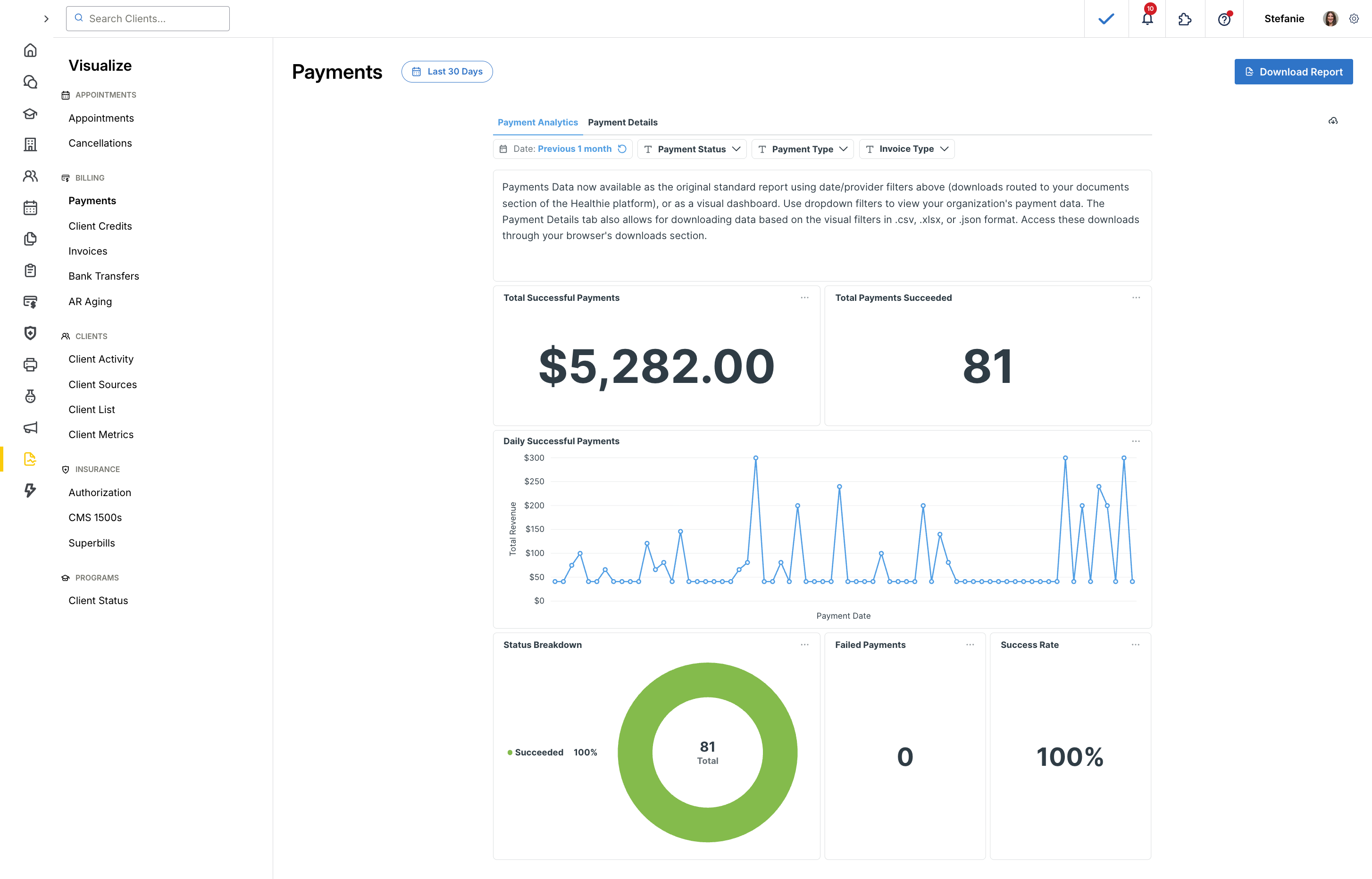
Dynamic Filtering for Complete Control
The dashboard puts you in control with dynamic filtering across multiple dimensions, allowing you to drill down into exactly the data you need to answer specific questions on demand:
- Date Range: Analyze specific time periods for financial reporting or trend analysis—from single days to full years
- Payment Status: Filter by successful or failed transactions to identify payment issues, monitor collection rates, and quickly address billing problems
- Payment Type: Isolate by client charged, failed payment, outside payment, payment refunded or retried payment to understand your revenue patterns.
- Invoice Type: Separate manual invoices, scheduled payments and no-invoice transactions to better understand your billing workflows
These filters can be combined dynamically to answer sophisticated questions instantly:
- Did switching to recurring client packages for my services reduce my failed payment rate in Q4?
- How much revenue did I collect last month compared to the same month last year?
- What percentage of my manual invoices are failing, and is it trending up or down over time?
You generate the exact custom report you need, when you need it. No waiting, no support tickets, no manual data manipulation.
Comprehensive Data Maintained
The Details view within the Payments Dashboard provides a real-time raw data table of successful and failed payments. The Details view can be filtered dynamically and downloaded.
The Payments Report is maintained and provides a downloadable report of successful payment data only. This report can be filtered by date range and provider, and generated as a CSV file.
Both the Dashboard Details view and Report include:
- Transaction amounts
- Dates and timestamps for precise reconciliation
- Client and provider associations
- Invoice IDs for easy cross-referencing
- Item descriptions for purchased services or packages
- Bank transfer status and expected dates
- Tax amounts charged
This granular visibility helps you understand not just your gross sales, but where it's coming from and what factors influence payment success.
Seamless Export Capabilities
While the dashboard is designed for real-time exploration, we understand that some workflows still require traditional exports for analysis. The Payment Dashboard Details view and Payments Report maintain full download functionality, allowing you to:
- Export filtered data for reconciliation with external accounting systems
- Share reports with accountants or financial advisors
- Maintain historical records for tax preparation and audits
- Build custom analyses in your preferred spreadsheet or BI tools
The Details view contains data for successful and failed payments, while the Report contains data for successful payments only.
The downloaded Payments Report retains all the detailed columns you're familiar with, ensuring continuity with existing workflows while giving you the option to work directly in the dashboard when speed matters.
Real-Time Access Without System Impact
One of the most meaningful features of the Payments Dashboard is how it delivers instant insights while ensuring system reliability. By querying data directly from Healthie's data warehouse rather than production systems, the dashboard enables you to run analyses on-demand. That can mean checking yesterdays’ payments, reconciling last months’ bank transfers, or preparing year-end reports without creating load on systems that your providers and clients depend on.
This architecture means you can run complex queries during peak appointment hours without any impact on scheduling performance, client portal responsiveness, or provider workflows. Your financial operations and clinical operations remain completely independent, ensuring consistent performance when it matters most.
For solo practitioners and growing practices where payment visibility is paramount, this reliability advantage is transformative. This eliminates bottlenecks and removes the need to coordinate timing of financial analyses around operational demands.
Get Started Today
Financial clarity drives better business decisions. With instant access to comprehensive payments data you can spend less time chasing down transaction details and more time focusing on what matters most: delivering exceptional care to your clients.
Ready to explore your payments data? Head to the Visualize tab in your Healthie account and try out the enhanced Payments Dashboard. For detailed guidance on navigating the report, understanding specific data fields, or troubleshooting payments issues click here.