

Product Updates

May 2026 Healthie Product Updates

May 2026 Healthie Product Updates: Ambient Scribe, Client Metrics, and Smarter Billing

Melissa Bhatia
Melissa Bhatia
Published on Jun 02, 2026
Updated on Jun 02, 2026

May was about giving providers more room to focus on their clients. This month's releases targeted the moments in a clinical day where administrative friction tends to build: switching between screens mid-session, manually overriding billing defaults, and documenting care. The result is a platform that moves faster and requires less manual correction.

Read on for the highlights from this month's releases. 

Ambient Scribe: charting for in-person & phone sessions

AI Scribe has dramatically reduced documentation burden for telehealth — Ambient Scribe brings that same effect to in-person and phone sessions, so providers spend less time on notes regardless of how care is delivered.

How it works → 

  • A "Launch Ambient Scribe for In-Person Session" prompt appears directly within appointment details. 
  • Ambient Scribe is compatible with appointment types that include multiple contact methods (telehealth, in-person, or phone)
  • Chart note templates can be assigned to specific contact types once the feature is enabled on your account. 
  • Already using AI Scribe? This is an immediate expansion of your documentation coverage. 
  • Not yet using AI Scribe? Get started here

Client Metrics inside the charting interface

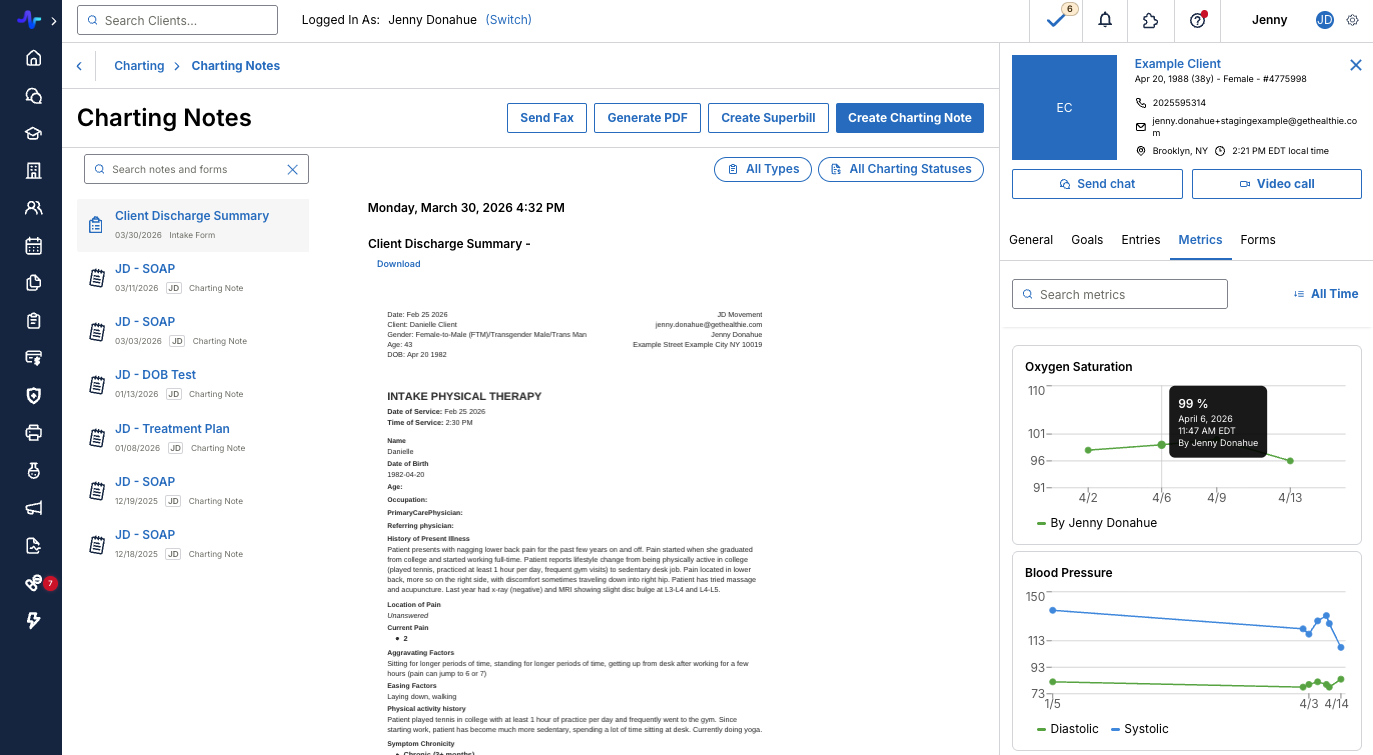
Clinical decisions are better when context is close at hand. The new Metrics tab in Quick Profile brings a client's full metrics history directly into the charting interface — no tab-switching, no navigating away mid-session.

All configured client metrics display as interactive line graphs across multiple dates, making it easy to spot trends without breaking your charting flow. Search by metric name, filter by date range, or hover any data point to see the exact value and date. This update keeps the clinical picture front and center, so tracking outcomes over time is built into the session. 
Learn More

Client-level billing type

You can now assign a persistent billing type — Insurance or Self-Pay — directly within each client's profile. This setting automatically overrides global Appointment Type defaults, so the right billing workflow fires at every appointment without manual intervention.

It's particularly useful for edge cases: clients with pending insurance verification, those who prefer self-pay despite having coverage on file, or any situation where the default doesn't fit. Set it once per client, and the platform handles the rest.

Learn More

Additional updates

May also delivered several targeted improvements across clinical and operational workflows:

  • Fullscript Labs integration: Lab results from Fullscript now sync automatically into patient profiles and the Labs tab.
  • E-Rx and E-Labs orders linked to chart notes: Lab orders, prescriptions, and PDMP check records can now be associated directly with chart notes. Contact us to enable hello@gethealthie.com.
  • Smart phrases in addendums and task comments: Smart Phrases are now available in chart note addendums and task comments via the lightbulb icon in the rich text editor.
  • Document sharing search improvement: The Share Document modal now loads up to 500 clients instantly, with live search available immediately.
  • Additional AI Scribe updates: Providers can now exclude specific form fields from AI Scribe, and a persistent tab widget keeps Ambient sessions visible when switching tabs.
  • Minor bug fixes: Includes a new "Technical Problems" cancellation reason, clearer group appointment series banners, and invoice sender dropdown fixes for multi-org setups.

Read more in the May 2026 Release Notes

Content Spotlight

Blog: How Fullscript Labs Fits Into Your Clinical Workflows

The Fullscript Labs integration within Healthie brings lab ordering and results into the same environment where care is already documented. Providers can access Fullscript from within a client's Healthie portal, order labs through their synced Fullscript account, and view results directly in the Client Overview and Labs tab — no PDFs to track down, no systems to switch between.

Read Here

Looking Ahead

The team is already building what's next, and your feedback shapes the roadmap. See what's in development, vote on upcoming features, and subscribe to get notified the moment something you're waiting on goes live.

Explore the Product Roadmap →

Every update we ship is a step toward making Healthie lighter, cleaner, and more intuitive — whether you're a growing practice or a well-established one. Thank you for the bug reports, feedback, and roadmap votes that shape what we build.

Have questions or ideas? Reach us at hello@gethealthie.com.

Launch, grow & scale your business today.

Product Updates

May 2026 Healthie Product Updates

May 2026 Healthie Product Updates: Ambient Scribe, Client Metrics, and Smarter Billing

May was about giving providers more room to focus on their clients. This month's releases targeted the moments in a clinical day where administrative friction tends to build: switching between screens mid-session, manually overriding billing defaults, and documenting care. The result is a platform that moves faster and requires less manual correction.

Read on for the highlights from this month's releases. 

Ambient Scribe: charting for in-person & phone sessions

AI Scribe has dramatically reduced documentation burden for telehealth — Ambient Scribe brings that same effect to in-person and phone sessions, so providers spend less time on notes regardless of how care is delivered.

How it works → 

  • A "Launch Ambient Scribe for In-Person Session" prompt appears directly within appointment details. 
  • Ambient Scribe is compatible with appointment types that include multiple contact methods (telehealth, in-person, or phone)
  • Chart note templates can be assigned to specific contact types once the feature is enabled on your account. 
  • Already using AI Scribe? This is an immediate expansion of your documentation coverage. 
  • Not yet using AI Scribe? Get started here

Client Metrics inside the charting interface

Clinical decisions are better when context is close at hand. The new Metrics tab in Quick Profile brings a client's full metrics history directly into the charting interface — no tab-switching, no navigating away mid-session.

All configured client metrics display as interactive line graphs across multiple dates, making it easy to spot trends without breaking your charting flow. Search by metric name, filter by date range, or hover any data point to see the exact value and date. This update keeps the clinical picture front and center, so tracking outcomes over time is built into the session. 

Learn More

Client-level billing type

You can now assign a persistent billing type — Insurance or Self-Pay — directly within each client's profile. This setting automatically overrides global Appointment Type defaults, so the right billing workflow fires at every appointment without manual intervention.

It's particularly useful for edge cases: clients with pending insurance verification, those who prefer self-pay despite having coverage on file, or any situation where the default doesn't fit. Set it once per client, and the platform handles the rest.

Learn More

Additional updates

May also delivered several targeted improvements across clinical and operational workflows:

  • Fullscript Labs integration: Lab results from Fullscript now sync automatically into patient profiles and the Labs tab.
  • E-Rx and E-Labs orders linked to chart notes: Lab orders, prescriptions, and PDMP check records can now be associated directly with chart notes. Contact us to enable hello@gethealthie.com.
  • Smart phrases in addendums and task comments: Smart Phrases are now available in chart note addendums and task comments via the lightbulb icon in the rich text editor.
  • Document sharing search improvement: The Share Document modal now loads up to 500 clients instantly, with live search available immediately.
  • Additional AI Scribe updates: Providers can now exclude specific form fields from AI Scribe, and a persistent tab widget keeps Ambient sessions visible when switching tabs.
  • Minor bug fixes: Includes a new "Technical Problems" cancellation reason, clearer group appointment series banners, and invoice sender dropdown fixes for multi-org setups.

Read more in the May 2026 Release Notes

Content Spotlight

Blog: How Fullscript Labs Fits Into Your Clinical Workflows

The Fullscript Labs integration within Healthie brings lab ordering and results into the same environment where care is already documented. Providers can access Fullscript from within a client's Healthie portal, order labs through their synced Fullscript account, and view results directly in the Client Overview and Labs tab — no PDFs to track down, no systems to switch between.

Read Here

Looking Ahead

The team is already building what's next, and your feedback shapes the roadmap. See what's in development, vote on upcoming features, and subscribe to get notified the moment something you're waiting on goes live.

Explore the Product Roadmap →

Every update we ship is a step toward making Healthie lighter, cleaner, and more intuitive — whether you're a growing practice or a well-established one. Thank you for the bug reports, feedback, and roadmap votes that shape what we build.

Have questions or ideas? Reach us at hello@gethealthie.com.

Scale your care delivery with Healthie+.