

Product Updates

March 2026 Healthie Product Updates

Explore Healthie's March 2026 updates: task commenting, redesigned self-scheduling, and cancellation tracking to streamline your practice.

Melissa Bhatia
Melissa Bhatia
Published on Apr 02, 2026
Updated on Apr 02, 2026

March updates focused on the details that add up — better task coordination, a smoother client booking experience, and structured data on every cancelled appointment. The throughline is simple: less friction, more visibility, fewer steps between your team and the information they need.

Read on for the highlights, plus a full roundup of everything else that shipped this month.

Add Comments to Tasks

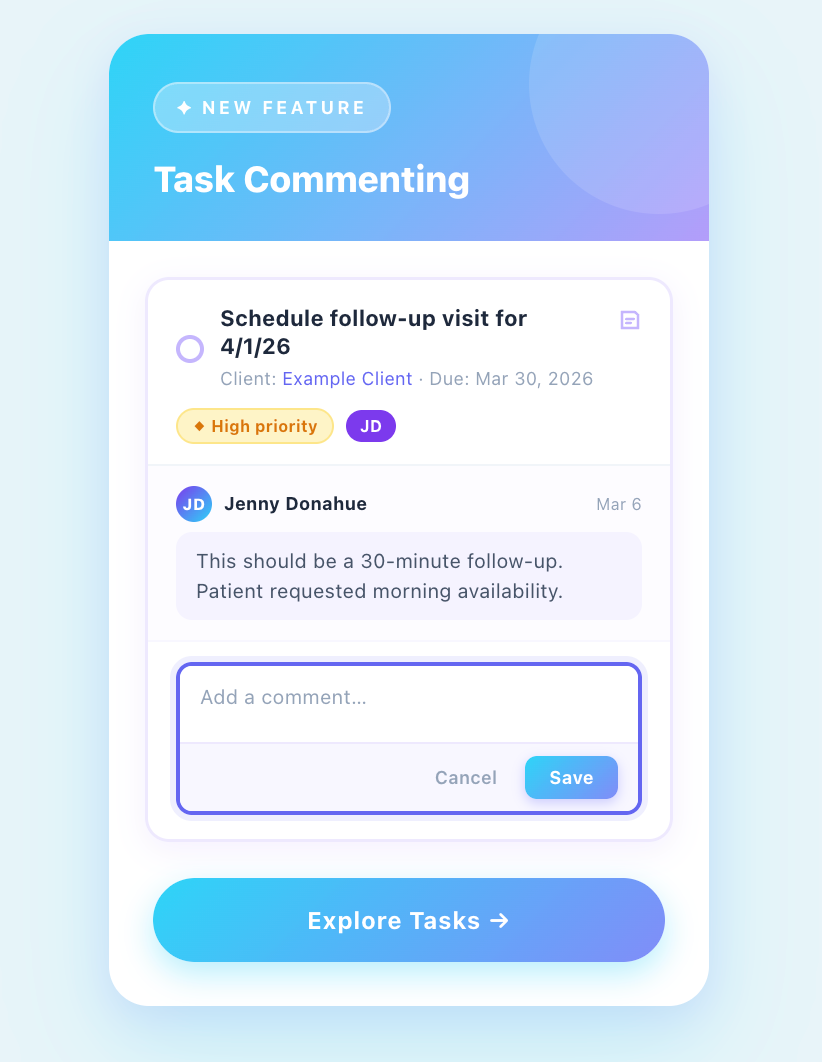
Keeping task context inside Healthie just got easier. We've added a commenting system directly to Tasks, giving providers a built-in way to log notes, add context, and record updates.

Every comment displays the author's name and timestamp, for thorough and transparent records. You can edit your own comments (with a clear "Edited" indicator for transparency), and comment count badges appear on task cards across all task views so your team can see at a glance where conversations are active.

For multi-provider practices especially, this means fewer Slack threads, side conversations, and a complete picture attached to every task.
👉 Learn More

Improved Client Self-Scheduling

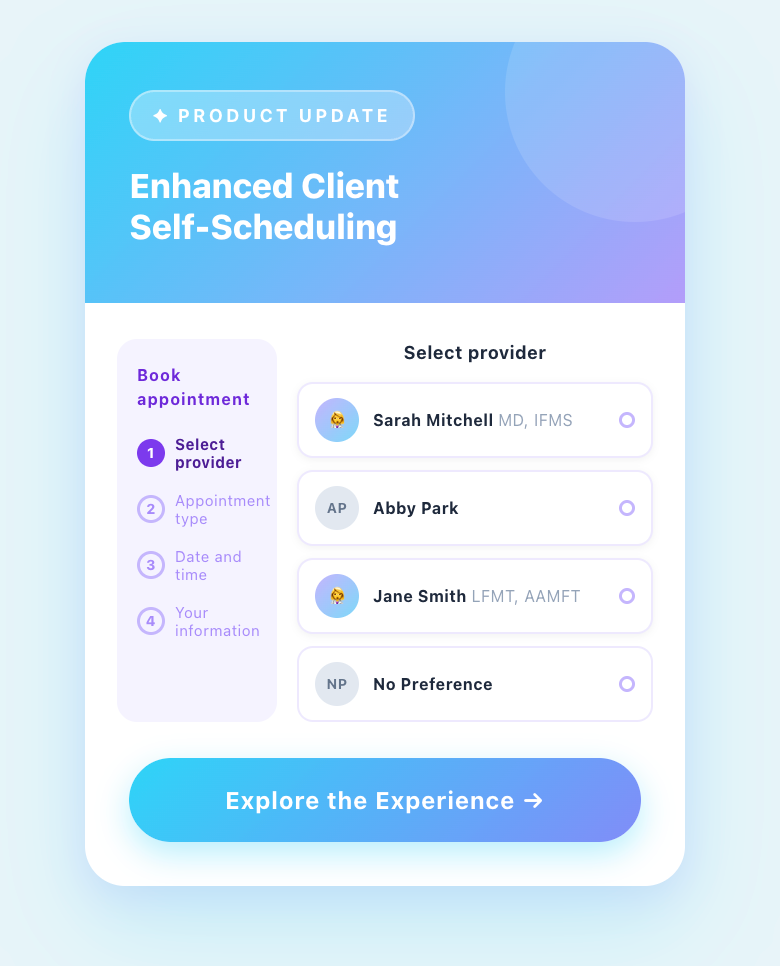
Your booking flow is often the very first experience a new client has with your practice. We've redesigned Healthie's self-scheduling experience from the ground up to reduce drop-off and help more clients complete their bookings with confidence.

Providers can now set client-facing appointment names and descriptions (separate from internal labels) so clients know exactly what to expect before they book. Navigation is smoother with larger click targets and intuitive back/forward buttons, and your brand color can now be applied directly to booking links and embeds for a harmonious client experience. Provider bios also appear consistently throughout the flow, giving clients the context they need to make informed choices.

All self-scheduling configuration now lives in one dedicated section — Settings > Self-Scheduling — making setup and ongoing management straightforward for administrators.
👉 Learn More

Cancellation Reason Tracking & Report 

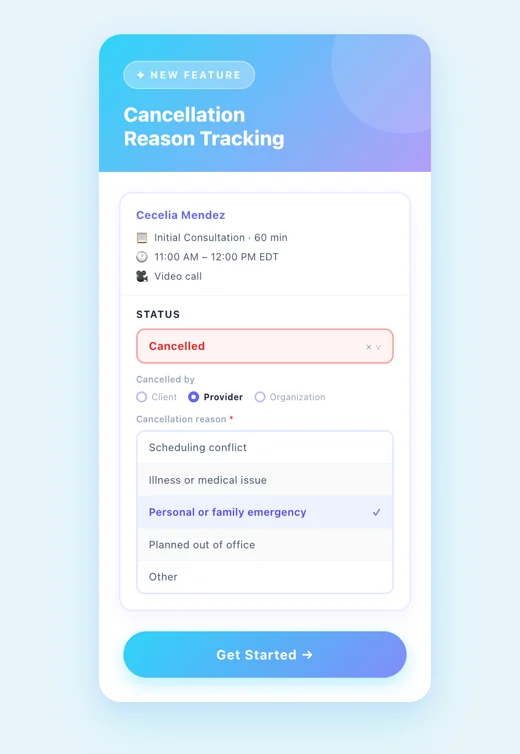
Understanding why appointments are cancelled is almost as important as knowing that they were. Healthie now captures structured cancellation data on every appointment, including who initiated the cancellation (client, provider, or organization), how it's classified, and the specific reason behind it.

Practices can configure whether clients, org members, or both are required to select a reason when cancelling, and reason options are tailored to each cancellation type to keep data clean and accurate. A new cancellation report gives administrators a clear view of trends over time, providing the foundation for moving from reactive scheduling to proactive retention strategies.

Enable this feature in Settings and require your team to provide a reason when marking an appointment as cancelled directly on the calendar.
👉 Watch the Tutorial

Additional Updates 

March also included a several platform-wide improvements worth noting:

  • Provider Utilization Dashboard: A new self-service dashboard in Visualize shows Total Availability Hours, Total Appointment Hours, and Utilization Percentage, empowering practice managers to make astute staffing decisions.
  • Automatic Custom Metrics from Auto-Score Forms: Clinical scale scores from forms like PHQ-9 and GAD-7 now automatically populate custom metrics to eliminate manual data entry.
  • Centralized Insurance Settings: All insurance billing configurations now live in a single hub under Settings > Insurance, with a single toggle to show or hide insurance features across your entire account.
  • Enhanced Labs Component: The Labs section on Client Overview now pulls from all connected lab integrations in one unified view, with status filtering, sort options, test name search, and no results cap.

Read more in the March 2026 Release Notes

Coming Soon

Two updates are on the way before the end of the month: 

  • AI Scribe notes will get clearer Convert and Delete actions, inline feedback prompts, and an AI-generated indicator on converted notes
  • CMS 1500 claims that reach "Sent" status will be automatically locked to prevent smart fields from overwriting historical billing data. View-only mode for insurance-permissioned users is already live today.

Blog Spotlight: Generating Claims for Group Sessions

Running group sessions is an efficient way to deliver care and build community, but billing for groups can be cumbersome. Healthie's latest update brings automated CMS 1500 claim generation to group chart notes, so CPT codes, units, and fees populate automatically from what you've already documented. No manual re-entry, no workarounds.

👉 Read More →

Looking Ahead

The Healthie team is continuously working on improvements inspired by real feedback from the community. Visit the Product Portal to see what’s coming next and lend your voice to influence what gets built.

👉 See What's Ahead →

March's releases reflect Healthie's ongoing commitment to making the platform lighter, cleaner, and more intuitive at every level of practice. Whether you're a solo provider looking to reduce administrative overhead or a group practice building scalable, compliant workflows, these updates are designed to meet you where you are. 

Launch, grow & scale your business today.

Product Updates

March 2026 Healthie Product Updates

Explore Healthie's March 2026 updates: task commenting, redesigned self-scheduling, and cancellation tracking to streamline your practice.

March updates focused on the details that add up — better task coordination, a smoother client booking experience, and structured data on every cancelled appointment. The throughline is simple: less friction, more visibility, fewer steps between your team and the information they need.

Read on for the highlights, plus a full roundup of everything else that shipped this month.

Add Comments to Tasks

Keeping task context inside Healthie just got easier. We've added a commenting system directly to Tasks, giving providers a built-in way to log notes, add context, and record updates.

Every comment displays the author's name and timestamp, for thorough and transparent records. You can edit your own comments (with a clear "Edited" indicator for transparency), and comment count badges appear on task cards across all task views so your team can see at a glance where conversations are active.

For multi-provider practices especially, this means fewer Slack threads, side conversations, and a complete picture attached to every task.

👉 Learn More

Improved Client Self-Scheduling

Your booking flow is often the very first experience a new client has with your practice. We've redesigned Healthie's self-scheduling experience from the ground up to reduce drop-off and help more clients complete their bookings with confidence.

Providers can now set client-facing appointment names and descriptions (separate from internal labels) so clients know exactly what to expect before they book. Navigation is smoother with larger click targets and intuitive back/forward buttons, and your brand color can now be applied directly to booking links and embeds for a harmonious client experience. Provider bios also appear consistently throughout the flow, giving clients the context they need to make informed choices.

All self-scheduling configuration now lives in one dedicated section — Settings > Self-Scheduling — making setup and ongoing management straightforward for administrators.

👉 Learn More

Cancellation Reason Tracking & Report 

Understanding why appointments are cancelled is almost as important as knowing that they were. Healthie now captures structured cancellation data on every appointment, including who initiated the cancellation (client, provider, or organization), how it's classified, and the specific reason behind it.

Practices can configure whether clients, org members, or both are required to select a reason when cancelling, and reason options are tailored to each cancellation type to keep data clean and accurate. A new cancellation report gives administrators a clear view of trends over time, providing the foundation for moving from reactive scheduling to proactive retention strategies.

Enable this feature in Settings and require your team to provide a reason when marking an appointment as cancelled directly on the calendar.

👉 Watch the Tutorial

Additional Updates 

March also included a several platform-wide improvements worth noting:

  • Provider Utilization Dashboard: A new self-service dashboard in Visualize shows Total Availability Hours, Total Appointment Hours, and Utilization Percentage, empowering practice managers to make astute staffing decisions.
  • Automatic Custom Metrics from Auto-Score Forms: Clinical scale scores from forms like PHQ-9 and GAD-7 now automatically populate custom metrics to eliminate manual data entry.
  • Centralized Insurance Settings: All insurance billing configurations now live in a single hub under Settings > Insurance, with a single toggle to show or hide insurance features across your entire account.
  • Enhanced Labs Component: The Labs section on Client Overview now pulls from all connected lab integrations in one unified view, with status filtering, sort options, test name search, and no results cap.

Read more in the March 2026 Release Notes

Coming Soon

Two updates are on the way before the end of the month: 

  • AI Scribe notes will get clearer Convert and Delete actions, inline feedback prompts, and an AI-generated indicator on converted notes
  • CMS 1500 claims that reach "Sent" status will be automatically locked to prevent smart fields from overwriting historical billing data. View-only mode for insurance-permissioned users is already live today.

Blog Spotlight: Generating Claims for Group Sessions

Running group sessions is an efficient way to deliver care and build community, but billing for groups can be cumbersome. Healthie's latest update brings automated CMS 1500 claim generation to group chart notes, so CPT codes, units, and fees populate automatically from what you've already documented. No manual re-entry, no workarounds.

👉 Read More →

Looking Ahead

The Healthie team is continuously working on improvements inspired by real feedback from the community. Visit the Product Portal to see what’s coming next and lend your voice to influence what gets built.

👉 See What's Ahead →

March's releases reflect Healthie's ongoing commitment to making the platform lighter, cleaner, and more intuitive at every level of practice. Whether you're a solo provider looking to reduce administrative overhead or a group practice building scalable, compliant workflows, these updates are designed to meet you where you are. 

Scale your care delivery with Healthie+.