



Product Spotlight: Care Alerts
Care Alerts lets your team pin critical client flags that surface the instant a record is opened. This ensures that every provider starts with the context they needs.

In busy clinical settings, pertinent client information can get lost in the shuffle. Verbal handoffs get dropped, notes get buried, and parts of the team are left without the context they need.
Care Alerts solves this by making that information impossible to miss. Providers and administrators can pin client-specific flags directly to a record, and those alerts surface front and center on the Client Overview and Quick Profile the instant someone opens it.
Below is a look at what Care Alerts does, how it works, and how to configure it for your practice.
What's new: Care Alerts
Care Alerts is a purpose-built flagging system designed to make critical client context visible from the start of every interaction. Use cases include clinical risk flags, MAT protocol notes, legal considerations, insurance issues, scheduling preferences, and more. Whatever your team needs to surface about a client, Care Alerts gives you a standardized, reliable place to put it.
What the feature includes:
- High-priority flagging: Mark an alert as High-Priority so it stands out immediately for any provider who opens the record.
- Expiration dates: Set alerts to auto-retire when no longer relevant. No manual cleanup required.
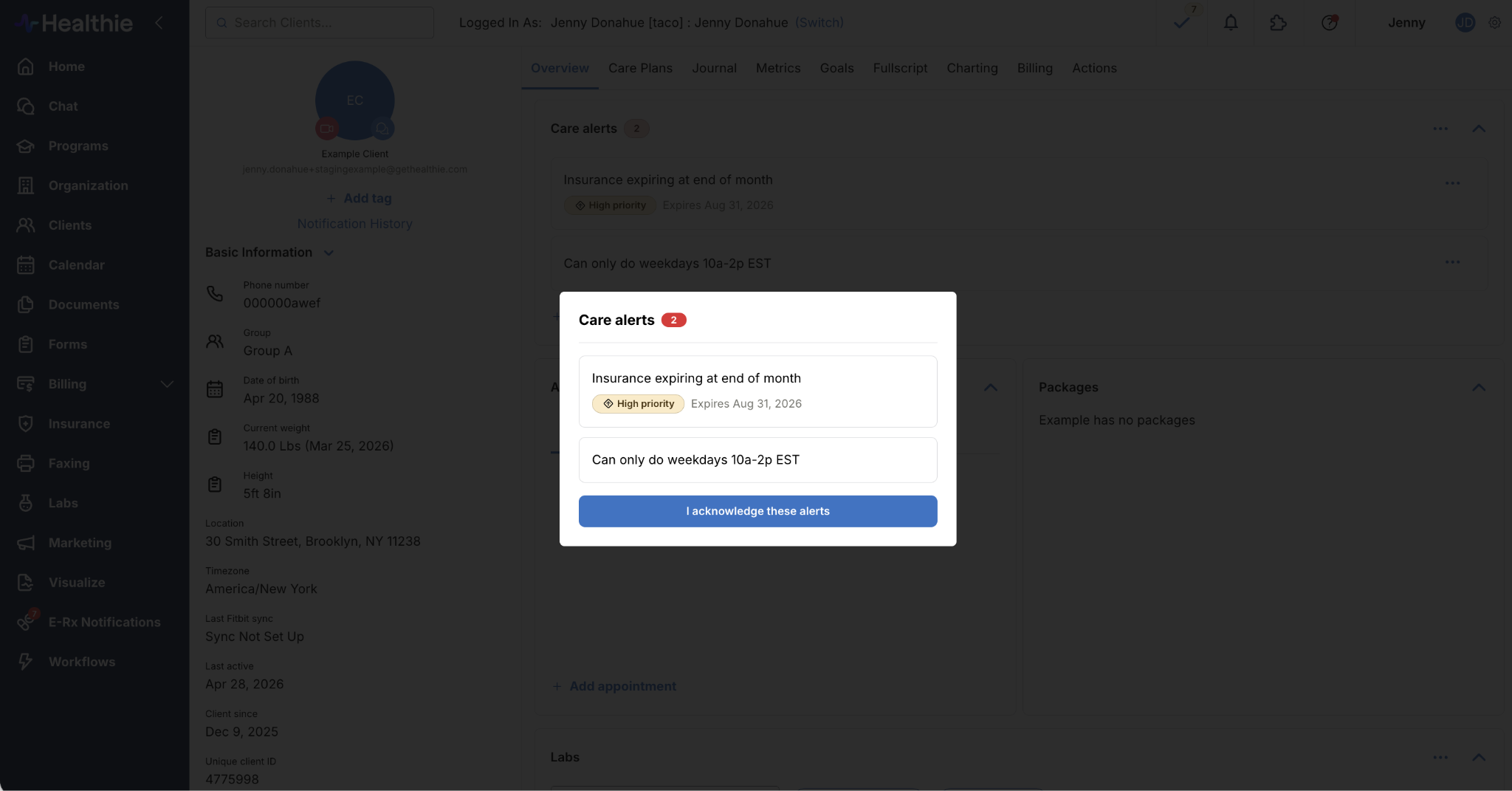
- Acknowledgment modal: Require providers to confirm they've seen a client's active alerts before accessing the profile. Particularly useful for high-acuity clients, compliance-sensitive workflows, or any situation where a missed flag has real consequences.
- Audit trails: Every create, edit, and delete is logged, giving your practice a complete record of alert activity for compliance and accountability.
How it works
Care Alerts is off by default. Practice owners and administrators can enable it from Settings > Care Alerts and configure acknowledgment requirements to match their team's workflow. Once enabled, all team members can add, edit, and dismiss alerts for any client they have access to, and alerts are visible practice-wide.
As an API-first platform, Healthie also supports configuring and maintaining Care Alerts at scale. Practices can auto-create and update alerts via the Healthie API, making it practical to standardize protocols and flag management across locations without adding manual overhead.
Where Care Alerts appear
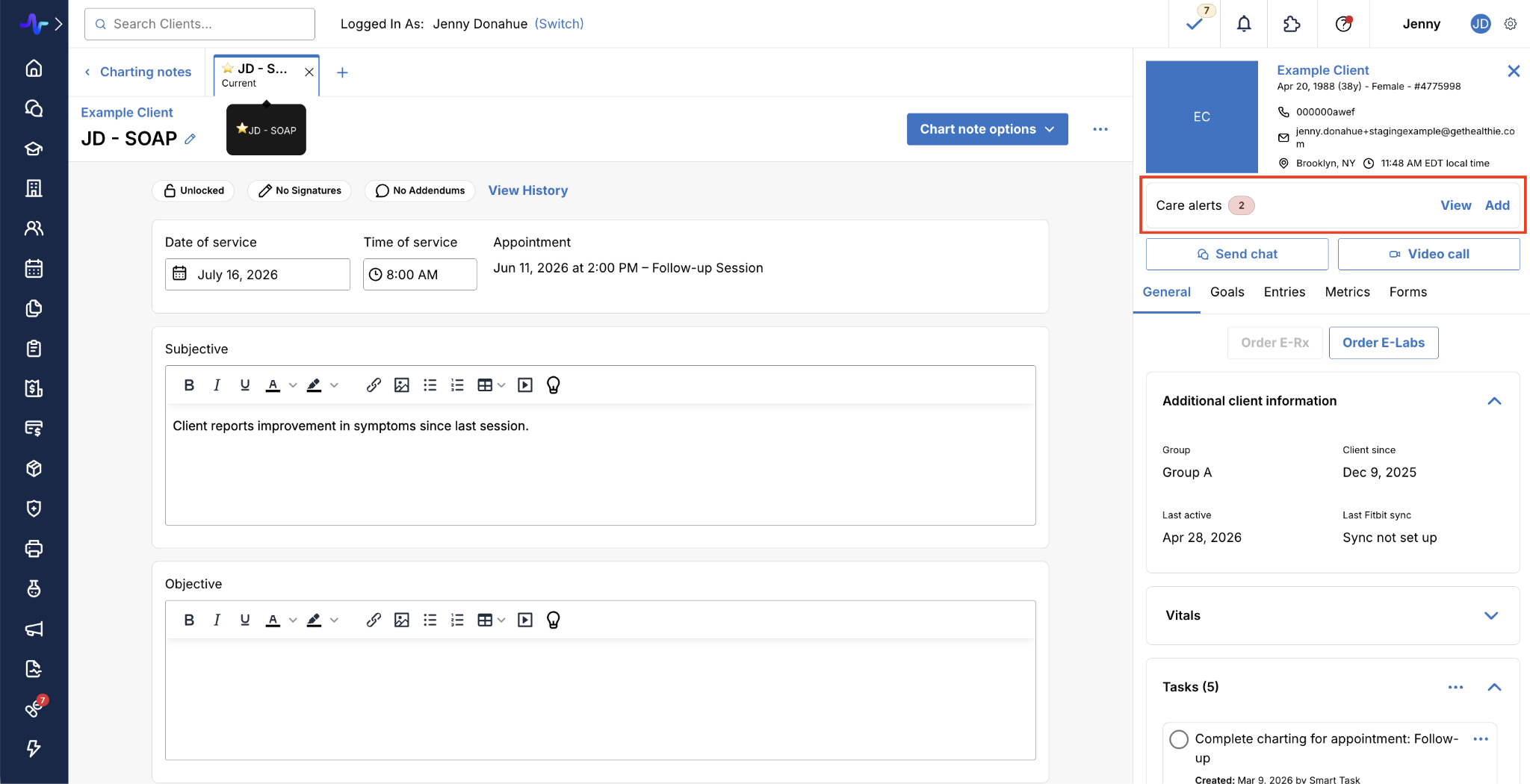
Care Alerts surfaces in the two places providers spend the most time: the Client Overview and the Quick Profile.
In the Client Overview, a dedicated Care Alerts section displays a status badge with the total count of active alerts. If acknowledgment is required, a modal surfaces all active alerts the moment the record is opened, and staff must confirm they've seen them before continuing. From this section, providers can add new alerts, edit existing ones, and dismiss alerts that are no longer relevant.
In the Quick Profile, alerts are accessible without leaving the current workflow. A summary card shows the total active alert count at a glance. Clicking View opens a side panel with full details; clicking Add creates a new alert on the spot. Whether a provider is mid-chart, in a message thread, or reviewing a billing record, critical client context is always within reach.
Who benefits from Care Alerts?
Care Alerts creates a shared layer of clinical context that travels with every client across every workflow. It addresses a problem that shows up at every level of clinical operations, and the value compounds the more people are involved in a client's care.
- Providers: Start every client interaction with the context that matters, without digging through notes or relying on verbal handoffs.
- Administrators: Configure alert behavior practice-wide, enforce acknowledgment where needed, and maintain a full audit trail of every change.
- Collaborative care practices: Use Care Alerts alongside Healthie's API to standardize flagging protocols across locations and ensure consistent care delivery at scale.
How to get started
Care Alerts is available now for all Healthie customers. Practice owners and administrators can enable it by navigating to Settings > Care Alerts and toggling the feature on. From there, configure acknowledgment requirements, activate the Care Alerts section in your Client Overview layout, and start adding alerts to client profiles.
👉 Learn more: Care Alerts overview