


Business

EHR vs. EMR: what’s the difference (and why it matters for your private practice)

EMR vs EHR. Learn the key differences and why the right choice shapes how your private practice schedules, bills, and grows.

Melissa Bhatia
Melissa Bhatia
Published on Jul 29, 2026
Updated on Jul 29, 2026

The terms get used interchangeably, but they're not the same. An EMR is a digital chart — a place to document clinical encounters for a single patient at a single practice. An EHR is a full practice operating system: scheduling, billing, telehealth, client engagement, and clinical documentation in one platform. The software category you choose shapes how your practice runs day to day, and what becomes possible as you grow.

EMR: the digital filing cabinet

EMR stands for Electronic Medical Record. It's essentially a digitized version of the paper chart — a place to document clinical notes, diagnoses, medications, and treatment history for a single patient at a single practice. EMRs were built for institutional settings like hospitals and large clinics, where dedicated staff handle billing, scheduling, and patient communication. In private practice, that support structure doesn't exist. 

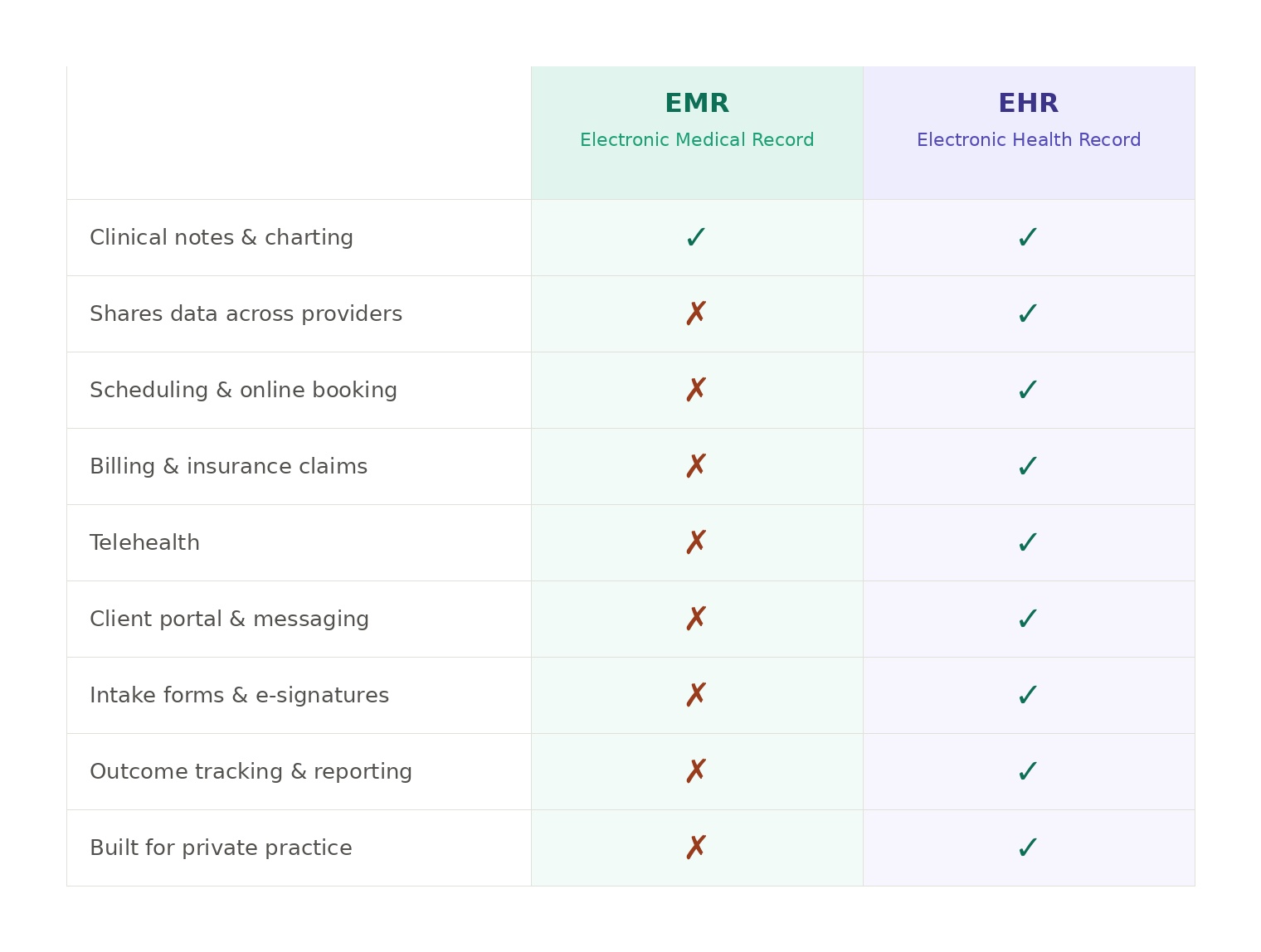
Without it, the limitations surface quickly.EMRs don't communicate well with other systems, rarely support billing or scheduling, and do almost nothing to support the client relationship outside of appointments. Every gap requires either a manual workaround or a separate tool.

At its core, an EMR is your filing cabinet moved to your computer screen.

EHR: the full picture

EHR stands for Electronic Health Record. On the surface it sounds similar to an EMR, but the difference in scope is significant.

An EHR is built to follow a patient across providers, settings, and time. More importantly for private practice owners: modern EHR platforms have expanded far beyond records. Today's best-in-class EHRs include:

  • Clinical documentation — SOAP notes, treatment plans, progress notes
  • Scheduling — online booking, reminders, cancellations
  • Billing & insurance — claims submission, superbills, payment processing
  • Telehealth — HIPAA-compliant video sessions built in
  • Client engagement — intake forms, secure messaging, patient portal
  • Reporting & compliance — audit trails, outcome tracking, HIPAA tools

That's the baseline. The more capable platforms go further, with open APIs for connecting tools you already use, deep customization across workflows and patient experience, group and program management for cohort-based care, and infrastructure that scales from solo practice to multi-location group without a system switch. 

{{free-trial-signup}}

EHR vs. EMR at a glance
Why so many practices start with an EMR

Many clinicians launch their practice on a standalone EMR because it's cheaper upfront, or because it's what they used in an institutional setting, where dedicated administrative and billing teams covered the gaps. 

In private practice, those gaps become problematic. In response, practices piece together what they need: a separate billing tool, a third-party telehealth platform, a form builder, a scheduling app. This results in four or five disconnected systems, manual data entry between them, and hours each week on administration that should be automatic.

The subtler cost is what becomes impossible, such as integrations that don't work across a fragmented stack, programs or group offerings your tools don't support, revenue streams you can't access because your software wasn't built for them. An EMR works on day one, but the cost shows up later.  

What modern private practice owners actually need 

For most specialties and practice sizes, the operational needs in private practice are largely the same. You need a platform built for the way you actually work:

  • Clients who book online and complete intake forms before the first session
  • Notes that are easy to write and legally defensible
  • Insurance billing that doesn't require a dedicated biller
  • Built-in telehealth for virtual-first or hybrid care models
  • Payments that collect automatically after every session

Whether you're a solo practitioner with a dedicated specialty or a multi-specialty clinic, the underlying infrastructure should be the same: flexible enough to cover all your workflows today, and built to grow with you (without hitting a ceiling). 

Once that foundation is in place, the real opportunity opens up. The best EHR platforms don't just run your practice but expand what's possible: group programs, membership offerings, outcome tracking, and integrations with the tools that make your practice uniquely yours.

Healthie’s EHR platform for private practice

Healthie is built specifically for private practice and group practice providers — not adapted from a hospital system.

Where legacy EMRs provide charting, Healthie gives you a complete operating layer for your practice: scheduling, documentation, billing, telehealth, client communication, and outcome tracking, all in one platform. There's no patchwork of tools, no manual syncing between systems. 

A few things Healthie does that a traditional EMR doesn't:

  • Automated client onboarding — send intake forms, consent docs, and payment info before the first appointment
  • Built-in telehealth — no Zoom workarounds, no third-party HIPAA BAA to chase down
  • Insurance + self-pay billing — submit claims, collect copays, and run superbills from the same platform
  • Group and program management — run classes, cohorts, or group sessions without bolting on a separate tool
  • API & white-label options — for practices that want to build custom workflows or embed Healthie in their own brand

The goal isn't to be the most feature-heavy platform on the market. It's to eliminate the administrative drag.

Launch, grow & scale your business today.

Business

EHR vs. EMR: what’s the difference (and why it matters for your private practice)

EMR vs EHR. Learn the key differences and why the right choice shapes how your private practice schedules, bills, and grows.

The terms get used interchangeably, but they're not the same. An EMR is a digital chart — a place to document clinical encounters for a single patient at a single practice. An EHR is a full practice operating system: scheduling, billing, telehealth, client engagement, and clinical documentation in one platform. The software category you choose shapes how your practice runs day to day, and what becomes possible as you grow.

EMR: the digital filing cabinet

EMR stands for Electronic Medical Record. It's essentially a digitized version of the paper chart — a place to document clinical notes, diagnoses, medications, and treatment history for a single patient at a single practice. EMRs were built for institutional settings like hospitals and large clinics, where dedicated staff handle billing, scheduling, and patient communication. In private practice, that support structure doesn't exist. 

Without it, the limitations surface quickly.EMRs don't communicate well with other systems, rarely support billing or scheduling, and do almost nothing to support the client relationship outside of appointments. Every gap requires either a manual workaround or a separate tool.

At its core, an EMR is your filing cabinet moved to your computer screen.

EHR: the full picture

EHR stands for Electronic Health Record. On the surface it sounds similar to an EMR, but the difference in scope is significant.

An EHR is built to follow a patient across providers, settings, and time. More importantly for private practice owners: modern EHR platforms have expanded far beyond records. Today's best-in-class EHRs include:

  • Clinical documentation — SOAP notes, treatment plans, progress notes
  • Scheduling — online booking, reminders, cancellations
  • Billing & insurance — claims submission, superbills, payment processing
  • Telehealth — HIPAA-compliant video sessions built in
  • Client engagement — intake forms, secure messaging, patient portal
  • Reporting & compliance — audit trails, outcome tracking, HIPAA tools

That's the baseline. The more capable platforms go further, with open APIs for connecting tools you already use, deep customization across workflows and patient experience, group and program management for cohort-based care, and infrastructure that scales from solo practice to multi-location group without a system switch. 

{{free-trial-signup}}

EHR vs. EMR at a glance

Why so many practices start with an EMR

Many clinicians launch their practice on a standalone EMR because it's cheaper upfront, or because it's what they used in an institutional setting, where dedicated administrative and billing teams covered the gaps. 

In private practice, those gaps become problematic. In response, practices piece together what they need: a separate billing tool, a third-party telehealth platform, a form builder, a scheduling app. This results in four or five disconnected systems, manual data entry between them, and hours each week on administration that should be automatic.

The subtler cost is what becomes impossible, such as integrations that don't work across a fragmented stack, programs or group offerings your tools don't support, revenue streams you can't access because your software wasn't built for them. An EMR works on day one, but the cost shows up later.  

What modern private practice owners actually need 

For most specialties and practice sizes, the operational needs in private practice are largely the same. You need a platform built for the way you actually work:

  • Clients who book online and complete intake forms before the first session
  • Notes that are easy to write and legally defensible
  • Insurance billing that doesn't require a dedicated biller
  • Built-in telehealth for virtual-first or hybrid care models
  • Payments that collect automatically after every session

Whether you're a solo practitioner with a dedicated specialty or a multi-specialty clinic, the underlying infrastructure should be the same: flexible enough to cover all your workflows today, and built to grow with you (without hitting a ceiling). 

Once that foundation is in place, the real opportunity opens up. The best EHR platforms don't just run your practice but expand what's possible: group programs, membership offerings, outcome tracking, and integrations with the tools that make your practice uniquely yours.

Healthie’s EHR platform for private practice

Healthie is built specifically for private practice and group practice providers — not adapted from a hospital system.

Where legacy EMRs provide charting, Healthie gives you a complete operating layer for your practice: scheduling, documentation, billing, telehealth, client communication, and outcome tracking, all in one platform. There's no patchwork of tools, no manual syncing between systems. 

A few things Healthie does that a traditional EMR doesn't:

  • Automated client onboarding — send intake forms, consent docs, and payment info before the first appointment
  • Built-in telehealth — no Zoom workarounds, no third-party HIPAA BAA to chase down
  • Insurance + self-pay billing — submit claims, collect copays, and run superbills from the same platform
  • Group and program management — run classes, cohorts, or group sessions without bolting on a separate tool
  • API & white-label options — for practices that want to build custom workflows or embed Healthie in their own brand

The goal isn't to be the most feature-heavy platform on the market. It's to eliminate the administrative drag.

Scale your care delivery with Healthie+.

All the tools you need to run your practice & work with patients.

All the tools you need to run your practice & work with patients.