


Dream It, Ship It: A 15-Minute Automation Instead of a Webhook
Event-driven workflow logic doesn't have to live in your codebase. Here's what I learned building one with Automate Builder, including where it pushed back.
Recently, a developer at a behavioral health practice asked me for a webhook. Why? Sessions sometimes run long, and the next patient ends up sitting alone in the video call with no idea what's going on. They were building a solution and needed an event for when a provider's call starts and ends, so they could relay that back to the patient.
A very reasonable ask. The body of work would then be a service that receives the webhook, tracks call state, waits a few minutes, checks again, and sends a message. Then retries. Then logging, carefully, because the payload has PHI in it. Then a conversation with your security team about another service in your BAA scope.
My first instinct was to say yes and start scoping the webhook. I've built services like that before, and they're never as small as they look.
Fortunately, we didn't need to build any of that. I had a working automation in staging in about 15 minutes, and their team didn't write or host any code.
I'm the forward deployed engineer at Healthie. Customers bring me problems every day, and my job is to solve them quickly, in a way that scales, without handing them something new to maintain. Many of those requests are some version of "when X happens, do Y." The larger point: Event-driven workflow logic no longer has to live in your codebase.
Here's how it works, what it's good at, and the mistakes that are easy to make.
What Automate is
Automate is Healthie's trigger-based automation engine. An automation is a series of steps: A trigger fires when an event happens in Healthie, then queries, conditions, delays, and actions run in sequence.
The part that matters for you as an engineer is how to configure them. Automations execute inside your existing Healthie infrastructure and covered by your existing BAA. No third-party automation tool, no external webhook receiver, no new place for PHI to live.
Customers have been running Automate since April, and their automations have taken action more than 17,000 times. Here are a few of the automations they built:
- When a client submits a form with a flagged screening answer, create a task for their provider that includes the answer.
- When an automated payment fails, create a task for the care team with the patient name, amount, and failure reason.
- Ninety days after an appointment, if the client has no future appointments booked, create a task for the scheduling team.
The waiting-room message is the fun example, but the most common automation in production is much less glamorous: marking appointments as Occurred when the note is signed.
Each of these would normally be a webhook handler plus a few API calls. In Automate, each is a configuration your team can inspect, test, and turn off. Browse more in the Healthie Product Catalog.
Automate Builder: Describe it, and the agent builds it
Automate Builder lets you build automations by describing them in plain language. It's an MCP server, distributed as an MCP Bundle (.mcpb), that installs in one click in Claude Desktop and works in other clients that support the format, including Claude Code. If you've used Dev Assist for API work, it's the same idea pointed at automations.
Automate Builder is safe to hand to an agent for two reasons:
- It only needs a staging API key. Automate Builder builds and tests everything in staging.
- Production changes only happen through you. When you're happy, Automate Builder gives you an import link that opens in your own browser session. You import the automation, set production values, and enable it yourself. The agent never holds production credentials.
Bring the second point to your security team: The agent can only change staging.
Here's our current Automate setup guide. Spoiler Alert: UI for you and your team's coming soon! Can't wait to share it with you.
What the build looked like
The prompt was the developer's message from Slack, pasted in as written:
"Hi! Quick question. Sometimes a session runs a bit longer than planned, and the next patient is waiting in the call without knowing why. We'd like to let them know automatically that their clinician is finishing with another client and will join very soon. Is there a way to know that a provider is still in a session? For example: A status or webhook when a provider's video call starts / ends (or is still active past the appointment end time). Thank you!"
Its first answer wasn't a yes. It checked the ask against the live schema and said what couldn't work as written: There's no "provider is still in a session" status, and an automation can't look at the provider's other appointment. Then it proposed what was buildable.
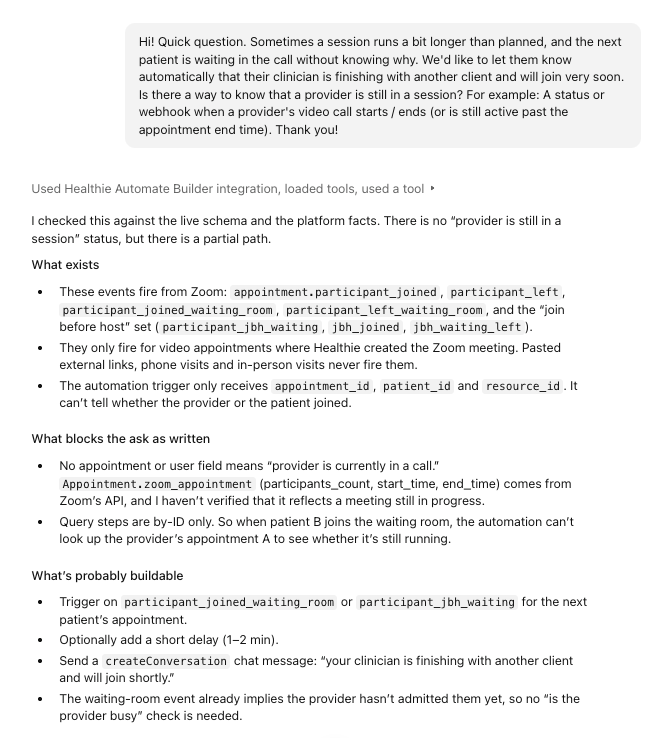
Automate Builder's first pass: what exists, what blocks the ask, and what's probably buildable.
What changed from the original ask
The automation that shipped isn't exactly the one the practice asked for. Each difference is a place where the ask and the platform met in the middle, and each one is worth knowing before you write your own prompt.
They asked for
What they got
Why
A webhook when the provider's call starts or ends
No webhook. Two automations inside Healthie.
The logic didn't need to leave Healthie.
Three minutes after the appointment start
Three minutes after the patient joins
Delays count from the trigger event.
(not in the ask)
A marker that's only written when the appointment's metadata is empty
Writing metadata replaces what's there instead of merging.
(not in the ask)
A check that the clinician hasn't joined before the message goes out
The waiting-room event only fires when the provider has Zoom's waiting room turned on, and the message shouldn't go out after the patient has been let in.
From there, here's what Automate Builder does.

What Automate Builder does between your prompt and production. Everything left of the import link happens in staging.
It checks for an existing recipe first. Automate Builder has a gallery of tested automation recipes, and if one already matches your workflow, adapting it beats drafting from scratch.
It plans the trigger and action against the real schema. From the agent's side, the GraphQL schema is a menu of hundreds of mutations, and nothing in it says which ones Automate can run as actions. Left alone, an agent will plan with whichever one looks right. So Automate Builder hands it the short list up front: the events that can start an automation and the mutations Automate can run. The agent plans from that list instead of guessing, and you don't find out when the automation fails to run.
For the waiting-room message, the plan came down to a trigger for the patient joining the call, a three-minute delay, a check on whether the clinician had started the meeting, and a chat message as the action. To know whether the clinician had joined, a second, one-step automation saves a small flag on the appointment when the meeting starts.
The waiting-room automation:
- Trigger: patient joins the Zoom waiting room
- Condition: one-on-one appointment with nothing in its metadata
- Delay: three minutes
- Condition: metadata is still empty, so the meeting hasn't started
- Action: send the patient a chat message reading "Hi {{first_name}}! Your clinician will join you in just a few minutes. Thank you for your patience, please stay on the call."
The session-started automation:
- Trigger: the meeting starts
- Condition: one-on-one appointment with nothing in its metadata
- Action: write a session-started marker to the appointment's metadata
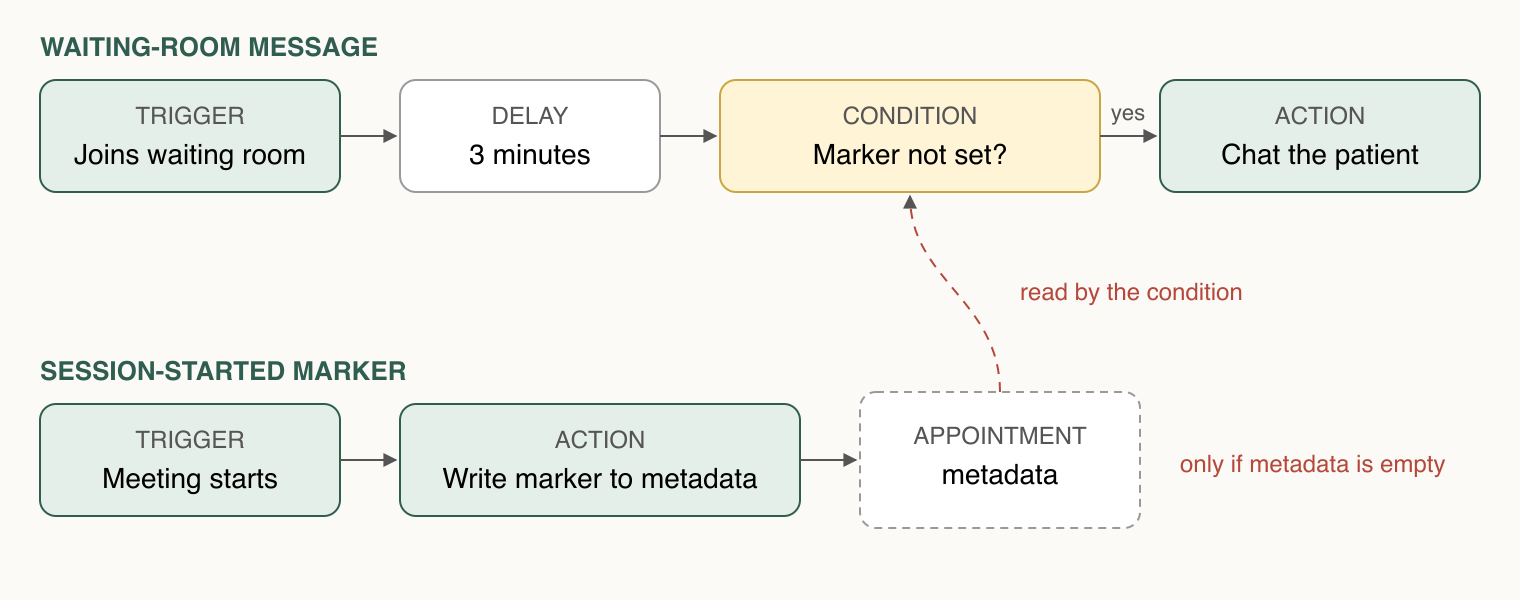
Two automations. The second one writes the flag the first one checks.
It resolves names into IDs. You describe appointment types, providers, or forms by name, and Automate Builder looks up the IDs in your staging account, so you never have to hunt for them.
It validates before it runs. Automate Builder checks the step graph locally: structure, template paths, and guards against the automation firing twice for the same event. Double-firing is the kind of bug that sends a patient two messages, and Automate Builder checks for it here, before anything executes.
It simulates, then test-fires. First it walks the step graph with a synthetic event, so you can see what each step would do. Then it creates the automation in staging, enables it, fires a real trigger, and shows you the run history. You see the chat message arrive in staging instead of a "should work."
Zoom events are the exception: They can't be test-fired, so for this build the live test is a real Zoom call on a staging appointment.
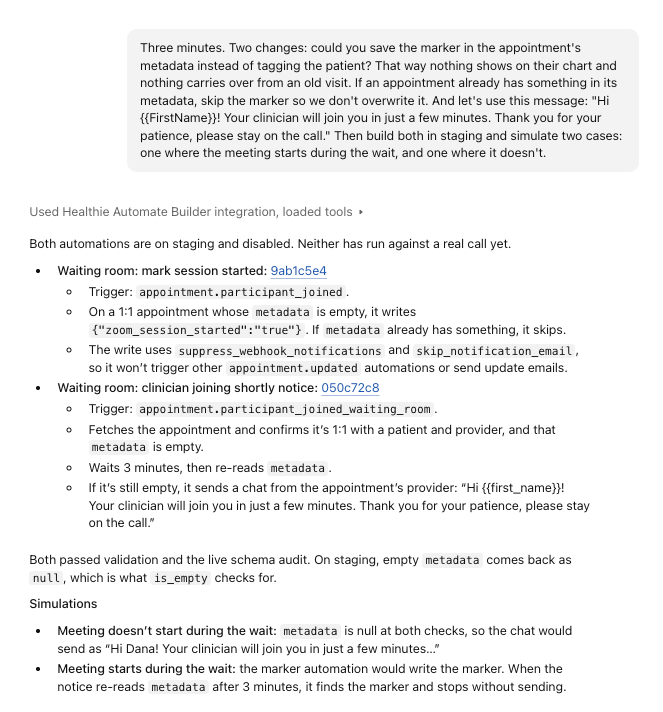
The follow-up prompt, and Automate Builder simulating both cases before anything runs.
It cleans up after itself. It removes or archives the test patients and records it created, so your sandbox doesn't fill up with fixtures.
It hands you the import link. You review in staging, open the link while signed into production, set your production values (assignees, message templates, and so on are variables, not hard-coded), and enable it.
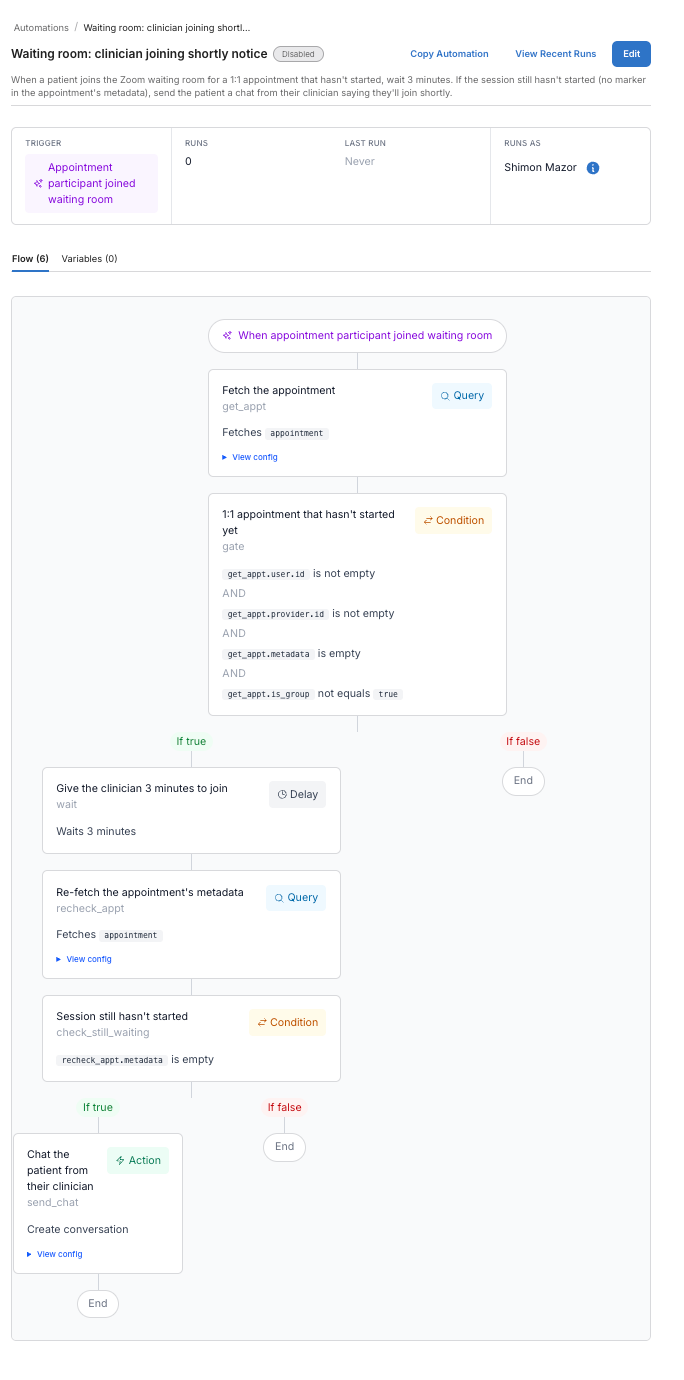
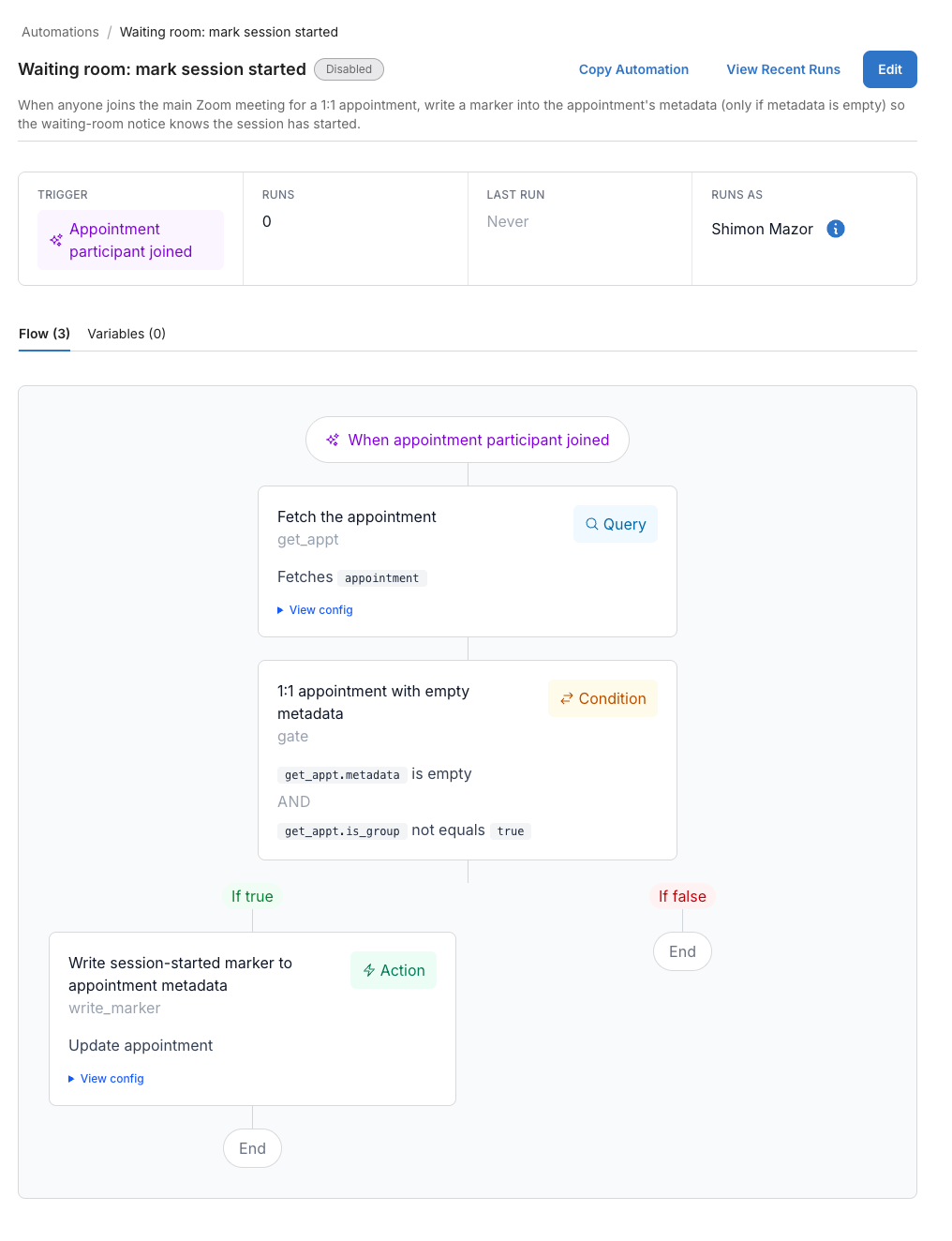
The two automations in the staging UI: the waiting-room notice (left) and the session-started marker (right).
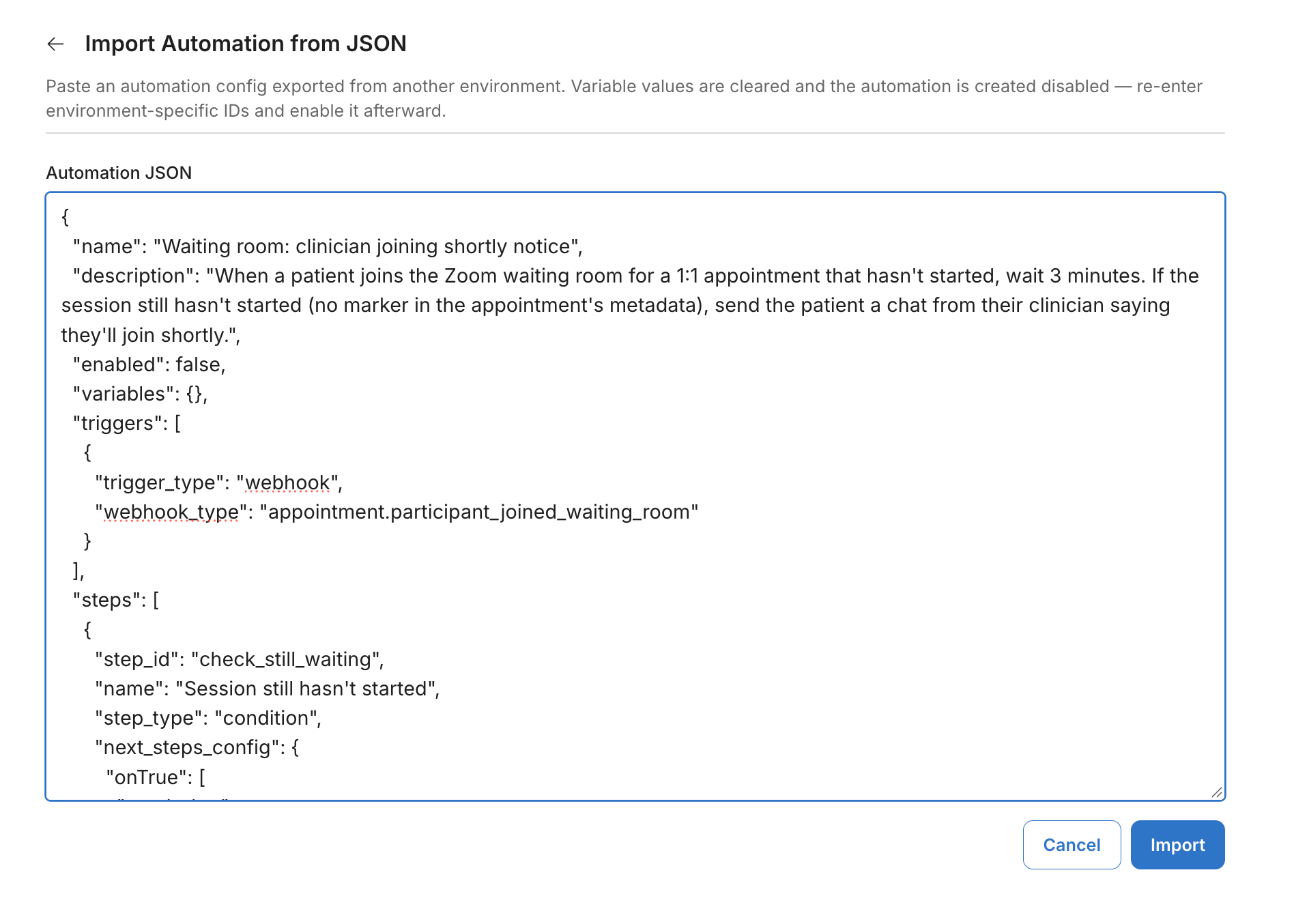
The import screen in production. Variables are cleared and the automation arrives disabled.
Fifteen minutes from prompt to tested in staging. More importantly, the result is a configuration the practice's team can read in Healthie, not a service only one engineer understands.
Where you still need to pay attention
These are the things I'd want someone to tell me before I started. Most came up on this exact build, and each one can break a workflow.
Healthie knows the clinician hasn't joined, not why. So the message can't say the clinician is finishing with another client, and it also goes out to a patient who joins early. Write copy that works for both.
Delays count from the trigger, not from the appointment time. The practice wanted three minutes after the start time. That's a current limitation: A delay can't be anchored to a scheduled time yet, so the message arrives three to four minutes after the patient joins.
Automations replace appointment metadata. They don't merge. If your code reads a metadata field, check whether any automation writes to it. Here, the flag would have overwritten anything stored there, so we asked the practice before turning it on and offered to skip appointments that already have metadata (at the cost of those patients not getting the message).
An event firing doesn't mean every field is populated. If your logic depends on a field, confirm it with a real test fire, not just the simulation.
Automate Builder keeps a list of known platform gaps. Events that don't fire in certain cases, action types that don't exist yet. Ask it before you promise a workflow to your clinical team.
Your AI client isn't covered by Healthie's BAA. Automate is. Keep PHI out of your prompts, build in staging, and check with your AI provider about a BAA.
An automation without an owner becomes permanent. Decide who reviews it before it's enabled, who watches its run history, and, for stopgaps, what would make you turn it off.
When not to use Automate
Automate is the right tool for a lot of "when X happens, do Y" requests, but not all of them. Reach for something else when:
- Healthie already does it. Intake flows, scheduled form sends, and appointment reminders are built in. Use those.
- The decision depends on data Healthie doesn't have. If the answer lives in your database, a webhook to your own code is still the right call.
- Automate Builder lists a known gap for the event you need. Ask first.
- The workflow is your product. If it's what makes you different, it belongs in your codebase.
Prompts to try
Paste any of these into Automate Builder, swap in your own names, and let it build and test in staging.
When a client submits the [intake form] and answers Yes to [screening question], create a task for their provider that includes the answer.
When an automated payment fails, create a task for the care team with the patient's name, the amount, and the failure reason.
When a lab result comes back outside the normal range, create a task for the ordering provider with the result.
Before you build anything: Which known gaps would affect this workflow?
What this changes for engineers
We know that the "when this happens, do that" request is reasonable, and we also know that each one adds code complexity for years to come.
The waiting-room message could have been a webhook consumer, a state store, and a scheduled job. Instead, it's a configuration the practice can read, test in staging, and turn off, running inside the compliance boundary it already has. That's where this kind of logic belongs. Your codebase should hold what makes your product different.
Automate is still in early access, and Automate Builder is a few months old. This is what I've learned so far, not a finished playbook, and some of the gaps above will close. If you build something with it, or hit a sharp edge I didn't cover, send it to hello@gethealthie.com. I'd like to hear what breaks.
To start, follow the Automate setup guide, or browse the Catalog and filter by Automation. Each item lists its trigger, logic, and action, which maps almost directly to how you'd phrase the request to Automate Builder.
Shimon Mazor is a forward deployed engineer at Healthie, where he works with customers building with Healthie.